
Deposit and Withdraw

Introduction
We999 Game deposit and withdraw options let Pakistani players move money in and out using local wallets. The app supports JazzCash and EasyPaisa, so you do not need a bank card or foreign account. Adding funds unlocks every game, while withdrawals send your winnings straight to your mobile wallet. Both processes take only a few taps once your account is ready. This guide explains each step, the rules behind them, and fixes for common payment issues.
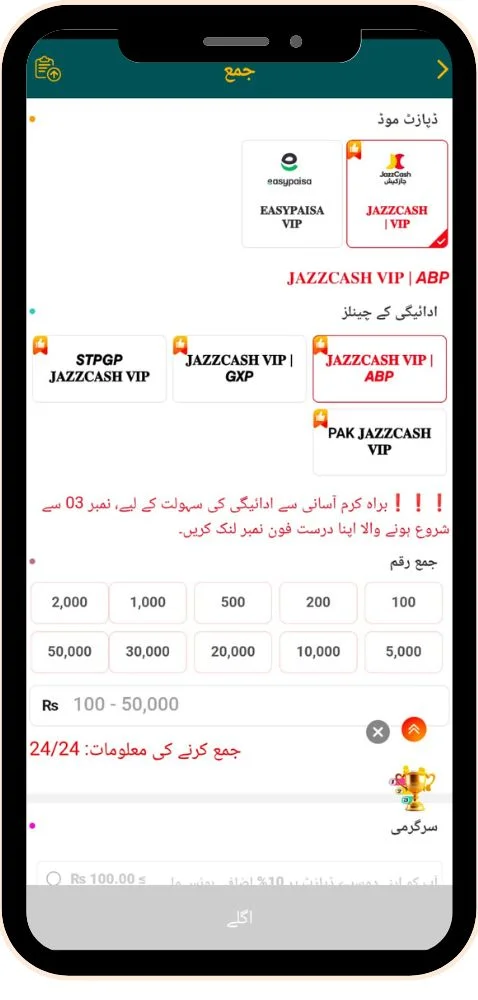
Money matters need extra care, especially on a real money app like this one. That is why we also cover wallet binding, wagering conditions, and safe payment habits in detail. Each section uses simple language, so even first-time users can follow along easily. However, keep in mind that limits and offers can change with every app update. Always confirm the current numbers inside the app before you send any payment.
What Do Deposit and Withdraw Mean on We999?
A deposit, also called a recharge, adds money from your mobile wallet to your We999 balance. You need this balance to join color prediction rounds, slots, and card games. A withdrawal does the reverse and sends your available balance back to JazzCash or EasyPaisa. Both actions appear in your transaction records, so you can track every rupee. The whole system runs in Pakistani rupees, which keeps the numbers easy to follow.
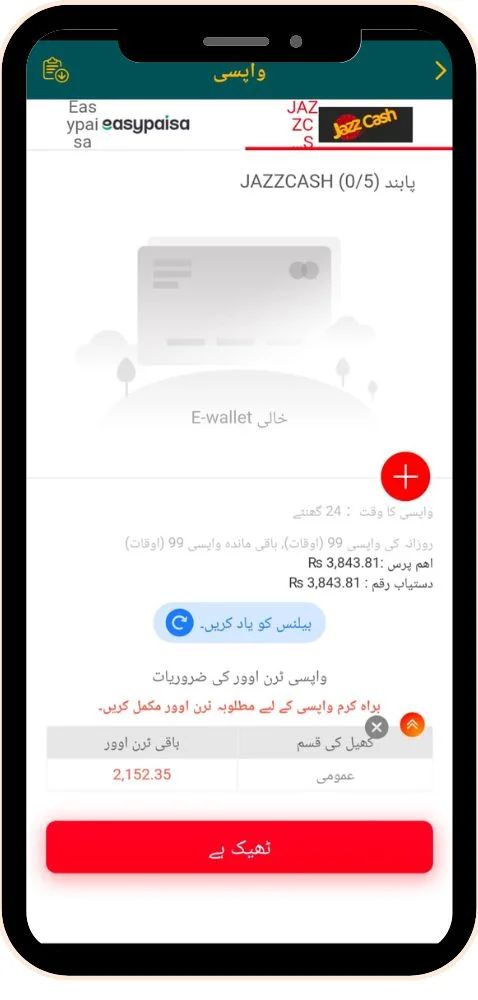
Before your first withdrawal, the app asks you to bind a wallet account to your profile. This step makes sure your winnings reach the correct person every time. Some balances also carry wagering conditions, especially money that came from bonuses. In simple terms, you must play through a certain amount before cashing out that money. Understanding these basics early saves you from confusion and delays later.
Which Payment Methods Does We999 Support?
We999 focuses on payment methods that most Pakistanis already use every day. Here is a quick look at how they compare inside the app.
| Method | Deposit | Withdraw | What You Need |
| JazzCash | Supported | Supported | Active JazzCash account and PIN |
| EasyPaisa | Supported | Supported | Active EasyPaisa account and PIN |
| Bank Transfer | Depends on app version | Depends on app version | Check the payment page for availability |
Availability can shift between app versions, so check the deposit page for the options shown to you.
How Do You Deposit Money Into We999?
Recharging your wallet is quick when you have balance in JazzCash or EasyPaisa. Keep your wallet app open nearby, since you may need to copy a transaction ID. Then follow these steps.
- Log in to the We999 app with your number and password.
- Tap Deposit or Recharge near the top of the home screen.
- Select JazzCash or EasyPaisa as your payment channel.
- Enter an amount that meets the minimum shown on the page.
- Tap Confirm to open the payment details or gateway.
- Complete the payment and send the exact amount displayed.
- Copy the transaction ID from your wallet confirmation message.
- Paste the ID back in We999 if the app requests it.
- Wait a few minutes for your balance to update.
How Do You Bind a Wallet for Withdrawals?
Binding your wallet is a one-time setup that most users finish in under a minute. Use an account registered in your own name to avoid rejected payouts.
- Open the Account or Me section in the app.
- Tap Bank Card, Wallet, or Withdrawal Account.
- Choose JazzCash or EasyPaisa from the list.
- Enter your wallet number and full account holder name.
- Confirm the details with your withdrawal password or OTP.
- Save and double-check that every digit is correct.
How Do You Withdraw Money From We999?
Cashing out your winnings follows a short and clear path. Make sure your wallet is bound and any wagering rules are complete before starting.
- Tap Withdraw on the home screen or wallet page.
- Check your withdrawable balance, which may differ from your total balance.
- Select your bound JazzCash or EasyPaisa account.
- Enter an amount within the minimum and maximum limits.
- Type your withdrawal password to authorize the request.
- Submit and note down the order number.
- Watch Withdrawal Records until the status changes to success.
- Confirm the money arrived in your mobile wallet.
What Rules Affect Your We999 Withdrawal?
Several conditions decide whether a withdrawal goes through smoothly. Knowing them in advance helps you avoid rejected requests.
Wagering Requirements
Bonus money usually needs a set amount of play before withdrawal. The app shows your remaining wagering target on the withdraw page.
Minimum and Maximum Limits
Each request must stay within the limits shown in the app. Very small or very large amounts may get blocked automatically.
Daily Request Count
Some versions limit how many withdrawals you can make each day. Combining small amounts into one request often works better.
Matching Account Name
Your bound wallet name should match your real identity details. A mismatch is one of the most common reasons for rejections.
Processing Time
Most requests process within a short window, but busy hours can slow things down. Weekends and holidays sometimes add a little extra waiting time.
Why Is Your We999 Deposit or Withdrawal Not Working?
Payment problems feel stressful, but most have simple solutions. Try these steps before you panic.
Deposit Sent but Balance Not Added
Money left your wallet, yet your We999 balance did not change.
- Wait 10 to 15 minutes, as some payments arrive late.
- Check the deposit record for a pending or failed status.
- Send your transaction ID and screenshot to support.
- Do not pay again until support confirms the first payment.
Payment Page Not Opening
The deposit gateway shows a blank screen or keeps loading.
- Switch from Wi-Fi to mobile data, or the reverse.
- Try the other payment channel listed on the page.
- Update to the latest APK from the official website.
Withdrawal Stuck on Pending
Your request shows pending for much longer than usual.
- Give it a few hours during busy periods.
- Check whether the app posted any maintenance notice.
- Share your order number with support for a status check.
Withdrawal Rejected or Refunded
The request failed, and the amount returned to your We999 balance.
- Verify your bound wallet number and account name.
- Confirm you finished the required wagering amount.
- Submit a fresh request after correcting the issue.
What Tips Make We999 Payments Safer?
A few careful habits protect your money from mistakes and scams. Keep these in mind with every transaction.
Test With a Small Amount First
Make a small deposit and withdrawal before using larger sums. This confirms the full cycle works for your wallet.
Save Every Transaction Proof
Take a screenshot of each payment and its transaction ID. Support resolves disputes much faster when you have clear evidence.
Pay Only Through the App
Never send money to numbers shared in groups or private messages. Use only the payment details the official app shows you.
Protect Your Wallet PIN
No genuine agent needs your JazzCash or EasyPaisa PIN. Keep it private, along with your We999 withdrawal password.
Set a Spending Limit
Decide on a monthly deposit limit and stick to it firmly. Real money games can cause losses, so play only with spare cash.
Conclusion
We999 Game Download makes deposits and withdrawals simple through two wallets most Pakistanis already trust. You recharge from JazzCash or EasyPaisa in a few taps and cash out to the same account later. Before your first payout, bind your wallet carefully and set a separate withdrawal password. Moreover, check your withdrawable balance, since bonus money may still carry wagering conditions. When a payment fails, your transaction ID and screenshots usually help support fix it quickly. Following these steps keeps your money moving smoothly in both directions.
Before trusting the app with larger sums, run a small test deposit and withdrawal first. In addition, read the limits shown inside the app, because they can change with new versions. Never send money to numbers shared outside the official payment page, no matter how convincing they seem. Keep your wallet PIN and withdrawal password private at all times, even from people claiming to be agents. Finally, remember that every real money app carries risk, so set a budget you can afford to lose. With these habits, managing your We999 balance stays safe, clear, and stress-free.
FAQs
Most deposits appear within a few minutes. If it takes longer than 15 minutes, contact support with your transaction ID.
It is best to use a wallet in your own name. Mismatched names often lead to rejected or delayed withdrawals.
Part of your balance may come from bonuses with unfinished wagering rules. Complete the required play, and that amount becomes withdrawable.
Some versions allow changes through the account section, while others need support help. Check your account settings or ask the support team.
Fees depend on the current app policy and payment channel. The withdraw page usually shows any charge before you confirm the request.